In a recent roundtable, sponsored by e-Sentio, the topic was mainly focused on workflow. While some of the firms were looking at a few different solutions, many were looking at (or already building) workflow using Microsoft's suite of Windows Workflow Foundation (WWF) and SharePoint 2007.
The popularity of SharePoint 2007 has exceeded even Microsoft's expectations and related technologies are coming along for the ride, with workflow being one of them. Cost, flexibility and the development environment seem to be the main factors for firms looking to leverage their SharePoint investment by building workflow. I've attached the PowerPoints slides from e-Sentio's presentation (with Nestor's blessing) and also attached an article I wrote highlighting some of the issues surrounding workflow development and the merits of Microsoft workflow.
I think that there are many opportunities to gain a competitive edge with workflow, as clearly illustrated in the number of workflow options spelled out in both e-Sentio's presentation and the article. There are also some unique challenges to be aware of in developing workflow and most of them are not technical, if you get my drift.
Thursday, June 07, 2007


Monday, May 21, 2007
Free MOSS wild card search add-on
For many, wild-card searching is a huge gap in the MOSS enterprise search product. Those of you that own the SPxConnect Enterprise Search product from XMLAW get the entire Ontolica suite, which is wrapped into their product. If you just want wild-card searching, Ontolica is now offering their wildcard add-on for free, I suppose a teaser of sorts to get you to buy their entire product line.
http://www.ontolica.com/Download/Request%20Product.aspx?prod=onwi&buy=0
http://www.ontolica.com/Download/Request%20Product.aspx?prod=onwi&buy=0
Wednesday, May 02, 2007
Sucession planning and the war for talent
Dr. Larry Richard, who heads up the Leadership and Development practice group for Hildebrandt recently spoke at my firm's Partner Retreat, where he opined on a number of points.
One of the more interesting dilemmas facing law firms is succession planning for all the baby-boomer partners heading towards retirement. In his presentation, 'The Talent Challenge: Lessons on Lawyers and Leaders', Dr. Richard states that the 80 million boomers in our population represent 70% of law firm Partners and are starting to retire. The next generation, GenX only represents 40 million of the population and the group farthest from Partnership, GenY, has a whopping 80 million. Bottom line is that the bulk of partnerships at large law firms across the country will be retiring soon. I'm not sure how many firms really have a good grasp on how to transition the knowledge, but more importantly, the relationships and books of business these partners have.

It's also an intriguing study when looking at the various generations with in a law firm today and the generational differences. Dr. Richard was kind enough to let me post one of the slides from his presentation, which does a great job of succinctly outlining the 4 generations and their traits.

What's most interesting is the transition that has taken place in the perception of lawyers entering a law firm in their first year. The Traditionalists and many Boomers entered the legal profession with the mindset that the first law firm they work for will be their last - lifers. Gen Yers will likely have anywhere from 5-8 career changes and many leave law school with no intention of practicing law. They won't sacrifice their personal life for the sake of their career, a heretical concept to many Traditionalists and Boomers. The current vintage of young associates is a far cry from the ones currently leading most firms, which makes it all the more difficult for them to relate and properly motivate them. Given the growth of most large firms and the relative flat line of law school graduation rates, it's a sellers market for law schools grads and younger associates. Another great quote from Dr. Richard's presentation, summing up the war for talent, comes from Robert Sheehan of Skadden, Arps - New York, "It's a sobering thought that all of my assets go down in the elevator every night, and I can only hope that they come back up the next morning."
Tuesday, March 27, 2007
Faceted Search Is Coming for SharePoint 2007
 Many folks have asked about 'faceted' search, which simply put allows for easier filtering of results. While our full-text search of WorkSite content is still getting used almost 900 times per day, our lawyers have been asking for this feature, which is still in beta for us, but coming soon.
What you'll notice about this live screen shot (see items in RED) is that the search engine is still presenting results from our 3 million documents in WorkSite in tenths of seconds and the faceting is working as advertised. Much of the content was redacted out, but you can get the gist of how it works. This capability has been made possible with the help of XMLAW and is not standard, out of the box, functionality with SharePoint 2007.
Wednesday, March 21, 2007
Morgan Stanley Verdict Overturned...
On a topic other than SharePoint...
It appears that the $1.58 billion verdict was overturned because of the plaintiff's inability to prove damages, despite the fact that the judge precluded any defense on liability. It likely won't affect the underlying e-discovery issues, but it's interesting that this was overturned after all the hoopla surrounding it.
http://www.foxnews.com/story/0,2933,260172,00.html
It appears that the $1.58 billion verdict was overturned because of the plaintiff's inability to prove damages, despite the fact that the judge precluded any defense on liability. It likely won't affect the underlying e-discovery issues, but it's interesting that this was overturned after all the hoopla surrounding it.
http://www.foxnews.com/story/0,2933,260172,00.html
Friday, March 16, 2007
Sheppard Mullin SharePoint Case Study
Here's a link to the case study on Microsoft's site, which was just published today. If you'd like to download a cleaner version of this in Word, click here.
I hope everyone enjoys their weekend and has a pint or two of green beer :)
Tom
I hope everyone enjoys their weekend and has a pint or two of green beer :)
Tom
Friday, February 02, 2007
2007 InnovAction Award
 Looking to add more hardware to your trophy room? The InnovAction Awards is a worldwide search for lawyers, law firms, and other deliverers of legal services who are currently engaged in some extraordinary innovative efforts. The goal is to demonstrate to the legal community what can be created when passionate professionals, with big ideas and strong convictions, are determined to make a difference. Each year, the College of Law Practice Management presents the coveted InnovAction Awards to those unsung heroes and rising stars within the legal profession who dare to think differently and succeed by doing so.
 For more information, go to their website.
Monday, January 22, 2007
Live on SharePoint 2007! Recap and Leasons Learned....
Well, our portal was officially switched over last Tuesday, January 16th, 2007. We spent last week doing office-by-office roadshows, giving demos to both staff and lawyers. Because of how we designed the site, it was important to break out the training sessions and we used 'volunteers' from the audience to log in with their account so people could see first hand how the system would look to them.
The feedback has been overwhelming. Our targeting of webparts, quick access to financial data and WorkSite document search features are scoring big points with our users. Since going live, we are AVERAGING over 1,000 document searches per day. We wouldn't be maintaining that level of use unless it worked :) Stuff that we had in our old portal is now looked at as 'new' features because they're actually easy to find!
Since going live, we have learned a few things. First, those of you on previous versions of SharePoint should proceed with caution if you're converting over webparts that worked in '03, looking to buy webparts from vendors converting their webparts from '03, or any freeware webparts. We were running webparts from '03 for MONTHS on our SharePoint 2007 environment with any issues and only found problems as the load begin to reach critical mass. So, don't be fooled into thinking that just because you didn't get an error right from the start that your webparts are safe.
The feedback has been overwhelming. Our targeting of webparts, quick access to financial data and WorkSite document search features are scoring big points with our users. Since going live, we are AVERAGING over 1,000 document searches per day. We wouldn't be maintaining that level of use unless it worked :) Stuff that we had in our old portal is now looked at as 'new' features because they're actually easy to find!
Since going live, we have learned a few things. First, those of you on previous versions of SharePoint should proceed with caution if you're converting over webparts that worked in '03, looking to buy webparts from vendors converting their webparts from '03, or any freeware webparts. We were running webparts from '03 for MONTHS on our SharePoint 2007 environment with any issues and only found problems as the load begin to reach critical mass. So, don't be fooled into thinking that just because you didn't get an error right from the start that your webparts are safe.
- Make sure to properly “dispose” of SharePoint objects when programmatically accessing the API to avoid excessive memory consumption and performance/stability problems.(see http://msdn2.microsoft.com/en-us/library/ms778813.aspx)
- Make liberal use of caching in memory, particularly of objects resulting from CPU or memory intensive processes, such as XSL transformations or disk access, but must also be mindful of caching or session state across processes (in a “web garden”) or across servers (in “web server farm”).(see http://support.microsoft.com/kb/313997/)
- Load test and look for memory leaks or process hogs *before* going live to identity potential problem areas. For example, a bug in the .NET Framework was causing a memory leak in XSL transformations that used inline script, which in turn was crashing the IIS worker processes and stopping the server. After a simple rewrite of these XSL transformations, memory usage returned to normal and stabilized the server.(see http://support.microsoft.com/kb/316775/EN-US/)
Friday, January 05, 2007
See the Sheppard Mullin SharePoint 2007 portal live!
On January 18th, ILTA will be sponsoring a webinar in which we will be demonstrating our SharePoint 2007 portal, featuring XMLAW. Non-ILTA members are also welcome to join, the connection fee is very reasonable.
To listen to the recording of this webinar, click here. You should just have to enter your name and then click View Recording (the key isn't required).
To listen to the recording of this webinar, click here. You should just have to enter your name and then click View Recording (the key isn't required).
Tuesday, December 19, 2006
Enterprise Search at Mofo - AnswerBase
Thanks to the generous contribution of Oz Benamram, we've been given some insight into their amazing tool at Mofo, AnswerBase. Built on the Recommind search engine, AnswerBase is the most comprehensive search tool built by a law firm (at least as far as I'm concerned). It aims to make it easy to find and drill down on anything relevant to a user's search term. It goes beyond searching the full-text of documents, finding related documents by industry, experts on the particular legal topics involved, etc. Click here to download the viewlet which gives a nice overview of the tool.
I'm shooting for "Oz-light" with our SharePoint enterprise search initiative, wish us luck!
I'm shooting for "Oz-light" with our SharePoint enterprise search initiative, wish us luck!
Thursday, December 14, 2006
SharePoint 2007 Enterprise Search: Screenshots
We're very close to launching our new portal, but to give our users a sense of what it will look like and to test performance, we launched a separate 'search site' on Tuesday. This site doesn't have any of the core portal navigation, it's a simple search page for searching our collection of documents in WorkSite (using xmlaw's stuff for indexing WorkSite). There were over 1,100 searches run during the first two days and the built-in reporting for tracking and monitoring searches is actually not bad.
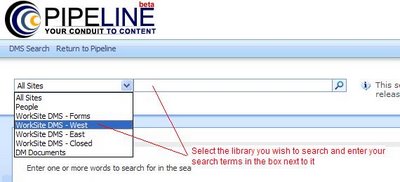 I was asked to show some screenshots of our 'search site'. As you'll notice, there isn't a left navigation menu and the Practice, Department, Office and Team horizontal navigation links that are available on our main portal don't show up either. The drop down list is pretty straight forward to select what criteria you want to search.
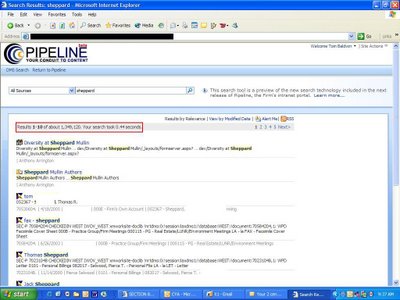
Here you'll see the search results page (I had to redact out a few things). Notice that over 1 million documents came back in the result set, in UNDER 1 SECOND. Using the xmlaw toolkit, we're able to index and display profile data from our DMS and the search term used is shown in the document abstract. So far, we are getting amazing feedback from the lawyers and staff:
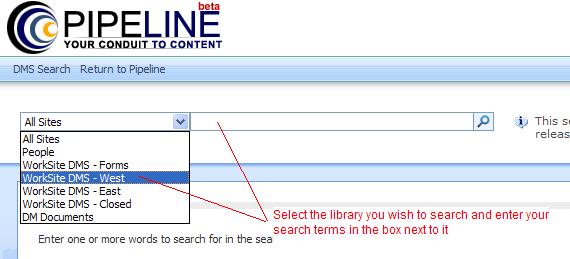 I was asked to show some screenshots of our 'search site'. As you'll notice, there isn't a left navigation menu and the Practice, Department, Office and Team horizontal navigation links that are available on our main portal don't show up either. The drop down list is pretty straight forward to select what criteria you want to search.
Here you'll see the search results page (I had to redact out a few things). Notice that over 1 million documents came back in the result set, in UNDER 1 SECOND. Using the xmlaw toolkit, we're able to index and display profile data from our DMS and the search term used is shown in the document abstract. So far, we are getting amazing feedback from the lawyers and staff:
- "WOW! JUST DID A COUPLE OF SEARCHES - VERY, VERY IMPRESSIVE"
- "It is like having our own personal Google! Worked great, document opened directly from the link."
- "Wow - that's FAST. I just put in "bulletin" and got 8,448 hits in .33 seconds...I couldn't believe it!"
- "it's really quite an improvement."
- "Wow. This is amazing! I just ran a search for a very common name here in the office and got 6,656 results in 0.31 seconds!"
- "After a couple of quick sample entries, all I can say is -- HUGE improvement! I typed in a word or short phrase and actually got a series of pertinent topics -- fast!"
- "Search on Steroids - Magnificent!"
Lawyers constantly complain about the built-in search within DM systems. This is a quick win and something worth looking into if you want to ease your way into using SharePoint. I can foresee the MOSS enterprise search giving Recommind a run for its money.
Tuesday, November 14, 2006
SharePoint 2007 Update - Enterprise Search Rocks!!
So, we are now less than a month away from going live on our SharePoint 2007 portal. Practice, Office, Admin Department, Client, Matter and personalized home pages are almost finished. We are using audiences and content targeting to deliver webparts and data on everyone's home page. We have ported over the CMS.Net reporting, so we have a decent amount of financial reports available and our firm directory is coming along nicely. Our content administrators are getting trained to start publishing content to their respective pages (we have content admins for virtually every page on the site) and our beta group is gearing up for testing within a week or two.
You've likely seen my previous posts on Windows Workflow Foundation (WWF), which has been a huge boon for us, now let me introduce you to the next new feature of SharePoint 2007 which I think is reason enough to make the switch, the new Enterprise Search engine.
Previously, the enterprise search in SharePoint had some limitations as far as how much data it would handle (scalability) and how well it actually found the stuff you searched for (relevance). Microsoft addressed this issue in spades with the 2007 release, so much so, that they are actually breaking out search as its own SKU in the event an organization hasn't already licensed SharePoint and would like to buy it separately.
With the help of XMLAW's web part for Enterprise Search within WorkSite, we pointed the SharePoint 2007 Enterprise Search engine at our DMS and let it rip. With almost 3 million documents firmwide, it didn't happen overnight, but soon we had access to all our documents via the search engine. Most search results come back in under 1 second, with more complex searches taking less than 3 seconds. We can also search WorkSite profile data, the search terms are highlighted in the search results and relevancy has been fantastic. Initial testing by our lawyers has produced rave reviews and we're actually rolling out a 'search site' with access to just the DMS prior to our firmwide portal release. This will help introduce the portal in an easy way and begin providing the lawyers a feature they have been longing for, fast searching on the DM.
The Enterprise Search engine with SharePoint 2007 can do lot's more than just search documents in your DMS. Using the BDC (Business Data Catalog), we're able to point this search engine at any database we want to. So, for example, if a lawyer wants to know how much time has been entered by x lawyers, to y client over z time frame, we can give them interface into this via SharePoint. While not as feature rich out of the box as something like Recommind or Autonomy, it can likely do 70%-80% of what those systems can offer at a fraction of the cost. So, for those of you looking to make an investment in an enterprise search tool in 2007, you should really take a long look at SharePoint Enterprise Search before moving on to other high priced options in the marketplace.
You've likely seen my previous posts on Windows Workflow Foundation (WWF), which has been a huge boon for us, now let me introduce you to the next new feature of SharePoint 2007 which I think is reason enough to make the switch, the new Enterprise Search engine.
Previously, the enterprise search in SharePoint had some limitations as far as how much data it would handle (scalability) and how well it actually found the stuff you searched for (relevance). Microsoft addressed this issue in spades with the 2007 release, so much so, that they are actually breaking out search as its own SKU in the event an organization hasn't already licensed SharePoint and would like to buy it separately.
With the help of XMLAW's web part for Enterprise Search within WorkSite, we pointed the SharePoint 2007 Enterprise Search engine at our DMS and let it rip. With almost 3 million documents firmwide, it didn't happen overnight, but soon we had access to all our documents via the search engine. Most search results come back in under 1 second, with more complex searches taking less than 3 seconds. We can also search WorkSite profile data, the search terms are highlighted in the search results and relevancy has been fantastic. Initial testing by our lawyers has produced rave reviews and we're actually rolling out a 'search site' with access to just the DMS prior to our firmwide portal release. This will help introduce the portal in an easy way and begin providing the lawyers a feature they have been longing for, fast searching on the DM.
The Enterprise Search engine with SharePoint 2007 can do lot's more than just search documents in your DMS. Using the BDC (Business Data Catalog), we're able to point this search engine at any database we want to. So, for example, if a lawyer wants to know how much time has been entered by x lawyers, to y client over z time frame, we can give them interface into this via SharePoint. While not as feature rich out of the box as something like Recommind or Autonomy, it can likely do 70%-80% of what those systems can offer at a fraction of the cost. So, for those of you looking to make an investment in an enterprise search tool in 2007, you should really take a long look at SharePoint Enterprise Search before moving on to other high priced options in the marketplace.
Wednesday, October 11, 2006
Live from the Chicago Ark Group KM Conference
Among other sessions, I will quickly blog about a panel currently going on, being moderated by Ron Friedmann with partners from Goldberg Kohn, Kelley Drye and Burns & Levinson. While the last two days have been focused on presentations by KM folks, this an interesting panel bringing to light the opinions of lawyers about KM topics and if it's really as relevent as WE think it is..
Does KM matter seems to be the overarching question. The lawyers agree that there is important in concept, but there isn't any agreement upon what it really means to them, which shouldn't be a shock.
How to coax lawyers to contribute or adhere to KM systems/policies was discussed with approaches that might work in small groups, don't might not scale well across the entire firm.
There's some debate about the value of finding documents fast, one partner noted, "our clients don't pay us to find documents more quickly" in response an audience member said "but they won't pay you to retrieve and produce documents more slowly" touche!
Does KM matter seems to be the overarching question. The lawyers agree that there is important in concept, but there isn't any agreement upon what it really means to them, which shouldn't be a shock.
How to coax lawyers to contribute or adhere to KM systems/policies was discussed with approaches that might work in small groups, don't might not scale well across the entire firm.
There's some debate about the value of finding documents fast, one partner noted, "our clients don't pay us to find documents more quickly" in response an audience member said "but they won't pay you to retrieve and produce documents more slowly" touche!
Tuesday, October 03, 2006
Lexis Nexis Announces atVantage, while Thomson Acquires LiveNote
I was recently invited to an 'Advisory Council' meeting by Lexis to discuss their future plans with InterAction and how to better leverage content within it. This meeting was on the heels of their announcement regarding atVantage, a new iteration of Market Intelligence.
Lexis has begun to realize the power of pushing content into InterAction and atVantage is the first attempt to do just that. They briefly showed us some screen shots of the new system and spent a lot of time getting feedback from the group as to the direction they should take with the product. I was encouraged that it truly wasn't a sales pitch, they really wanted to hear how they could better meet the needs of large law firms. The main take away from the session was that there is a lot of data that lawyers need to see related to a contact. Some data is generated by the firm and some sits externally, Lexis needs to figure out how to aggregate the data and present it in an easily consumable format for the lawyers. It may take a while, but it appears that Lexis is on its way towards a better, more information rich InterAction product.
Meanwhile....
Thomson announced last week that they have acquired LiveNote. I truly marvel at the Big 2's appetite for buying companies and then figuring out how to make it work in their product structure. Given that Lexis has the Applied Discovery offering, it shouldn't be long before Thomson/West look to also acquire a company that provide an online review tool for e-discovery.
Lexis has begun to realize the power of pushing content into InterAction and atVantage is the first attempt to do just that. They briefly showed us some screen shots of the new system and spent a lot of time getting feedback from the group as to the direction they should take with the product. I was encouraged that it truly wasn't a sales pitch, they really wanted to hear how they could better meet the needs of large law firms. The main take away from the session was that there is a lot of data that lawyers need to see related to a contact. Some data is generated by the firm and some sits externally, Lexis needs to figure out how to aggregate the data and present it in an easily consumable format for the lawyers. It may take a while, but it appears that Lexis is on its way towards a better, more information rich InterAction product.
Meanwhile....
Thomson announced last week that they have acquired LiveNote. I truly marvel at the Big 2's appetite for buying companies and then figuring out how to make it work in their product structure. Given that Lexis has the Applied Discovery offering, it shouldn't be long before Thomson/West look to also acquire a company that provide an online review tool for e-discovery.
Monday, August 14, 2006
Applied Discovery Fires Back at Law.com EDD Article
Last Friday, I received an e-mail from Miranda Glass at Applied Discovery, attempting to present their side of the story published in the August 10, 2006 online issue of Law.com titled, "Software Glitch May Have Erased E-Mail Text in Enron Suits.", which was also quickly found and distributed by Monica Bay.
Here's the e-mail:
On Friday, August 10th, Law.com published an article that, without some clarification, we believe has the potential to unnecessarily scare anyone who works on electronic discovery matters, regardless of whether using in-house solutions or any outside service provider. In case you were one of those who may have been alarmed by the article, we wanted to share with you the Letter to the Editor Applied Discovery submitted to Law.com in response.
August 11, 2006
Dear Editor: We would like to address a number of factual errors contained in an article published in the August 10, 2006 online issue of Law.com titled, "Software Glitch May Have Erased E-Mail Text in Enron Suits."
This story alleges that "a software bug may have erased text in emails produced for electronic document production being handled by Applied Discovery in the Enron civil suit." In fact, the Microsoft Outlook 2003 bug in question does not erase anything. The bug causes Outlook 2000 emails to appear blank on computers without a patch that Microsoft issued as part of its Office 2003 Service Pack 2 in September 2005. This bug affected what appears to be less than one-tenth of one percent of email documents.
Here's the e-mail:
On Friday, August 10th, Law.com published an article that, without some clarification, we believe has the potential to unnecessarily scare anyone who works on electronic discovery matters, regardless of whether using in-house solutions or any outside service provider. In case you were one of those who may have been alarmed by the article, we wanted to share with you the Letter to the Editor Applied Discovery submitted to Law.com in response.
August 11, 2006
Dear Editor: We would like to address a number of factual errors contained in an article published in the August 10, 2006 online issue of Law.com titled, "Software Glitch May Have Erased E-Mail Text in Enron Suits."
This story alleges that "a software bug may have erased text in emails produced for electronic document production being handled by Applied Discovery in the Enron civil suit." In fact, the Microsoft Outlook 2003 bug in question does not erase anything. The bug causes Outlook 2000 emails to appear blank on computers without a patch that Microsoft issued as part of its Office 2003 Service Pack 2 in September 2005. This bug affected what appears to be less than one-tenth of one percent of email documents.
To set the record straight:
- No data was lost as a result of this bug. It did not erase anything but simply caused the text of emails to not be displayed. The data is present and can be viewed by applying Microsoft's patch to address the error.
- In the Outlook 2000 emails affected by this bug, the To, From, Subject fields and attachments are 100 percent viewable.
- Less than .01 percent of the email documents involved were affected and 99.99 percent of all email materials were correctly identified and fully disclosed in the discovery process. No other materials appear to be affected by this bug.
- Applied Discovery does not use Microsoft Outlook to search email. Rather, Outlook is used to help display emails.
Applied Discovery has been working closely with Microsoft throughout this situation to address the needs and concerns of our clients and maintain the sanctity of our e-Discovery process. Microsoft has expressed confidence that this Outlook issue has been fully resolved. We encourage clients with lingering questions to contact us.
Subscribe to:
Posts (Atom)